

POS Billing Software vs Traditional Billing: Which Is Better?
Running a retail business involves much more than simply selling products and collecting payments. Retailers need to manage billing, GST invoices, inventory, customer payments, purchases, expenses,…
Running a retail business involves much more than simply selling products and collecting payments. Retailers need to manage billing, GST invoices, inventory, customer payments, purchases, expenses, and daily sales while providing customers with a fast and convenient checkout experience.
For many years, businesses have relied on traditional billing methods such as handwritten bills, calculators, spreadsheets, or basic desktop billing applications. These methods may work for very small businesses with limited transactions, but they can become difficult to manage as the business grows.
This is where POS Billing Software becomes important.
A modern POS system can connect billing with inventory, payments, customer records, GST invoicing, barcode scanning, and business reporting. Instead of treating billing as an isolated activity, businesses can use an integrated system to manage several parts of their daily operations from one platform.
However, does that mean traditional billing is no longer useful? Not necessarily. The right choice depends on your business size, transaction volume, product range, inventory requirements, number of employees, and growth plans.
In this guide, we will compare POS Billing Software vs Traditional Billing in detail. We will look at their features, benefits, limitations, costs, GST requirements, inventory management capabilities, and practical use cases for retail stores, supermarkets, pharmacies, and garment shops.
We will also explain how BillMantra can help businesses combine POS billing, GST billing, inventory, accounting, payments, and business reporting in one platform.
Table of Contents
- What Is POS Billing Software?
- What Is Traditional Billing?
- POS Billing Software vs Traditional Billing
- Key Differences Between POS and Traditional Billing
- POS Billing Software for Retail Stores
- POS Billing Software for Supermarkets
- POS Billing Software for Pharmacies
- POS Billing Software for Garment Shops
- POS Billing Software and GST Billing
- POS Billing Software and Inventory Management
- Benefits of POS Billing Software
- Limitations of Traditional Billing
- Cost Comparison
- How to Choose the Best POS Billing Software
- Why BillMantra Is a Smart Choice
- How BillMantra Simplifies Retail Billing
- Practical Business Examples
- Common Mistakes When Choosing POS Software
- POS Billing Software Checklist
- Frequently Asked Questions
- Conclusion
- Call to Action
What Is POS Billing Software?
POS Billing Software stands for Point of Sale Billing Software.
It is a digital system used by businesses to process sales and manage transactions at the point where customers purchase products or services.
A modern POS system can do much more than create a simple invoice.
Depending on the software, it can manage:
- Product billing
- GST invoices
- Barcode scanning
- Inventory
- Customer information
- Payment collection
- Sales returns
- Discounts
- Credit notes
- Purchase records
- Stock transfers
- Business reports
- Accounting
- Customer loyalty
- Digital invoice sharing
For retail businesses, POS software acts as a central system connecting sales with other business operations.
For example, when a customer purchases a product, the POS system can generate the bill, calculate applicable GST, record the payment, and update inventory.
This reduces the need to enter the same transaction into different systems.
How Does POS Billing Work?
A typical POS transaction can follow these steps:
- The salesperson selects or scans the product.
- The product price and applicable tax information are retrieved.
- The customer receives an invoice.
- The payment method is recorded.
- The transaction is saved.
- Inventory is updated.
- The sale becomes available in business reports.
This connected workflow is one of the biggest advantages of modern POS Billing Software.
What Is Traditional Billing?
Traditional billing refers to older or manual approaches to creating and managing sales invoices.
This can include:
- Handwritten bills
- Calculator-based billing
- Excel spreadsheets
- Basic desktop billing systems
- Separate accounting records
- Manual inventory registers
Traditional billing is not necessarily complicated for every business.
A small shop with a limited number of products and a low number of daily transactions may be able to operate with a basic billing method.
However, problems can appear when transaction volume increases.
Common Traditional Billing Process
A traditional retail transaction may look like this:
- Employee checks the product price.
- Product quantity is calculated manually.
- GST is calculated.
- Bill is prepared.
- Payment is collected.
- Sale is written into a register or spreadsheet.
- Inventory is updated separately.
Every additional manual step creates another opportunity for data-entry errors or delays.
POS Billing Software vs Traditional Billing
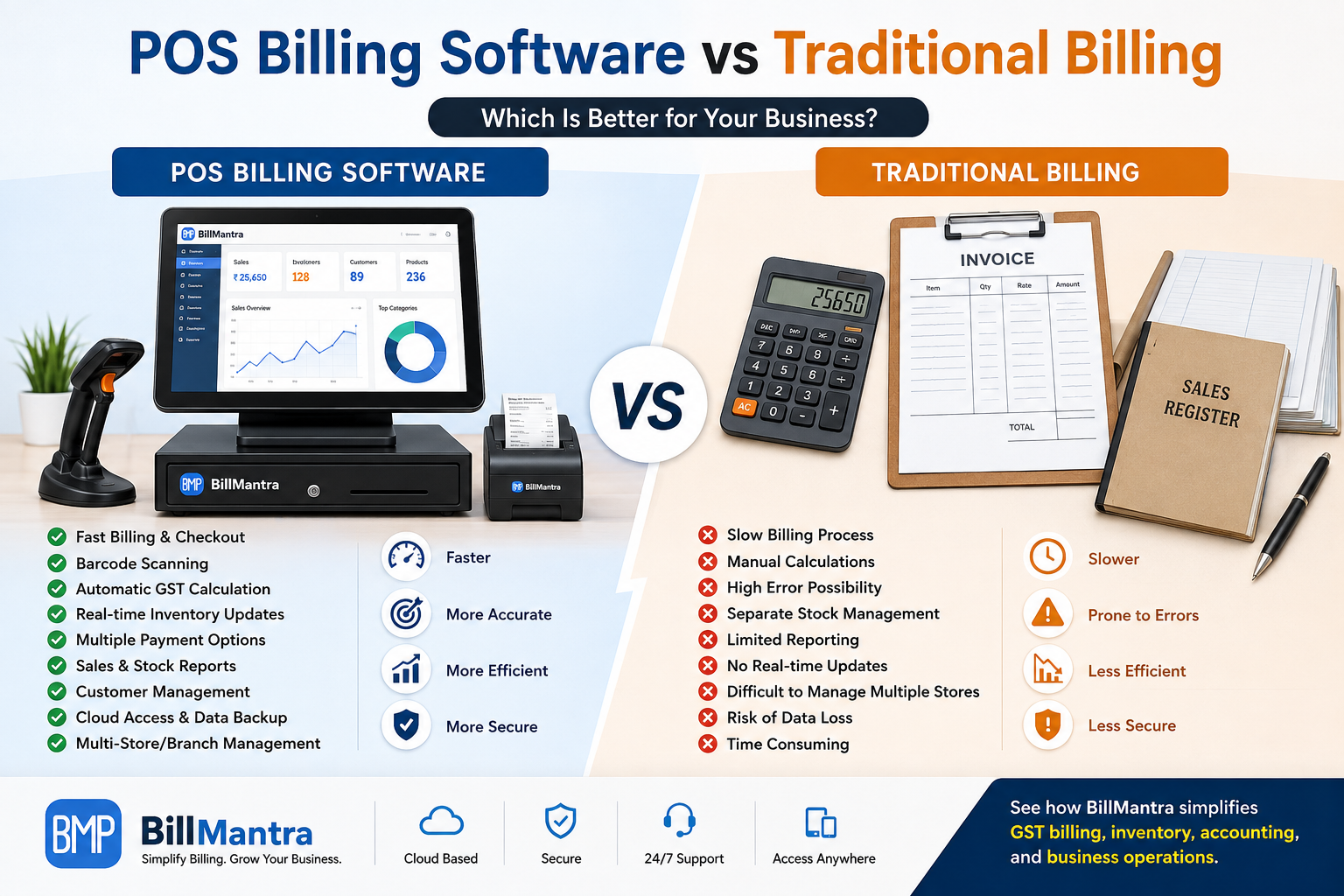
The biggest difference is automation.
Traditional billing generally requires more manual work, while POS Billing Software connects multiple business activities through one system.
| Feature | POS Billing Software | Traditional Billing |
|---|---|---|
| Invoice Generation | Fast and automated | Often manual |
| GST Calculation | Automated | Manual or semi-automated |
| Barcode Scanning | Available | Usually unavailable |
| Inventory Updates | Automatic/integrated | Often manual |
| Payment Tracking | Integrated | Separate records may be needed |
| Customer Database | Digital | Often manual |
| Sales Reports | Real-time/automated | Manual preparation |
| Stock Reports | Automated | Manual |
| Multi-Branch Management | Supported by many systems | Difficult |
| Accounting Integration | Available | Often separate |
| Digital Invoices | Available | Limited |
| Scalability | High | Limited |
| Business Insights | Detailed | Basic |
| Data Search | Quick | Time-consuming |
| Employee Tracking | Available in many systems | Limited |
The comparison shows why POS systems are increasingly attractive to growing retail businesses.
Key Differences Between POS and Traditional Billing
1. Billing Speed
Speed matters in retail.
Customers do not want to spend several minutes waiting for their invoice, especially during busy hours.
A POS system can retrieve product information quickly and generate an invoice automatically.
Traditional billing may require employees to manually enter product details and calculate totals.
2. Inventory Management
Inventory is one of the biggest differences.
With integrated POS software, sales can automatically affect stock levels.
Traditional billing often requires inventory to be maintained separately.
This creates a risk of stock records becoming outdated.
3. GST Billing
Modern POS systems can include GST information directly in the billing process.
Businesses can configure products with applicable tax details and generate structured GST invoices.
Traditional methods may require more manual calculations and verification.
4. Reporting
A POS system can generate reports based on recorded transactions.
Business owners can review:
- Daily sales
- Product sales
- Stock
- Payment collections
- Customer purchases
- Discounts
- Returns
- Profitability
Traditional billing usually requires manual compilation of this information.
5. Customer Management
Modern POS systems can maintain customer profiles and transaction history.
This can be useful for businesses that want to provide better customer service or introduce loyalty and marketing programs.
Traditional billing generally does not provide the same level of customer data management.
POS Billing Software for Retail Stores
Retail stores deal with frequent customer transactions.
A small retail store may start with a simple billing process, but as the number of products and customers increases, manual processes can become difficult.
A POS Billing Software for Retail Store can help manage:
- Product catalogues
- GST billing
- Barcode scanning
- Inventory
- Payments
- Customer records
- Sales returns
- Discounts
- Daily sales reports
Example: Grocery Retail Store
Imagine a grocery store selling hundreds of products.
A customer purchases:
- Rice
- Cooking oil
- Biscuits
- Soap
- Shampoo
Instead of manually entering each product, the employee can scan the barcodes.
The POS system retrieves the product information and adds the items to the invoice.
Once the payment is completed, the transaction can be recorded and inventory updated.
This creates a faster and more organized checkout process.
POS Billing Software for Supermarkets
Supermarkets usually have large product catalogues and high transaction volumes.
During peak hours, billing speed becomes particularly important.
A supermarket may need:
- Barcode scanning
- Multiple billing counters
- Fast product search
- Multiple payment modes
- GST billing
- Real-time inventory
- Stock reports
- Sales reports
- Employee management
- Customer management
Why POS Is Useful for Supermarkets
A supermarket may process hundreds or thousands of product transactions.
Manual billing can create queues and increase the workload for employees.
A POS system can make product identification and invoice generation faster.
It can also help management understand which products are selling quickly and which products may require replenishment.
POS Billing Software for Pharmacies
Pharmacies have specific inventory requirements.
Depending on the business and applicable regulations, pharmacies may need to manage:
- Product batches
- Expiry dates
- Purchase information
- Stock levels
- Supplier details
- Customer billing
- GST invoices
A suitable POS Billing Software for Pharmacy should therefore provide strong inventory management.
Batch and Expiry Management
Suppose a pharmacy has several batches of the same product.
The business needs to know which batch is available and when products are approaching expiry.
Integrated inventory features can make this information easier to manage.
A basic traditional billing method may not provide the same level of visibility.
POS Billing Software for Garment Shops
Garment stores often have products with multiple sizes, colours, styles, and categories.
For example, a single shirt design may be available in:
- Small
- Medium
- Large
- XL
- XXL
It may also be available in several colours.
Managing these variations manually can become difficult.
Barcode Billing for Garment Stores
Barcode scanning can make garment billing significantly faster.
Employees can scan products instead of manually searching for every item.
The system can also maintain product-level inventory and sales information.
This helps the store identify:
- Best-selling products
- Slow-moving products
- Available sizes
- Available colours
- Current stock
- Sales trends
POS Billing Software and GST Billing
GST compliance is an important consideration for Indian businesses.
A suitable billing system should help businesses create accurate GST invoices based on the applicable requirements.
Important invoice information may include:
- Business name
- GSTIN
- Invoice number
- Invoice date
- Customer details
- Product or service description
- HSN/SAC
- Taxable value
- Applicable tax
- Total invoice value
Automated GST Calculations
One advantage of integrated billing software is that tax calculations can be automated based on configured product and transaction information.
This reduces the need for employees to calculate taxes manually on every invoice.
GST Reports
Businesses should also consider whether their software provides useful GST-related reports.
These reports can help businesses and their accountants review transaction information and prepare relevant GST compliance workflows.
POS Billing Software and Inventory Management
Billing and inventory should ideally work together.
Consider a retailer that has 50 units of a product in stock.
If five units are sold through the POS system, the inventory should reflect the sale.
This provides a more accurate view of available stock.
Inventory Features to Look For
When choosing POS Billing Software, check whether it provides:
- Real-time stock tracking
- Batch management
- Expiry management
- Multi-warehouse management
- Stock transfers
- Low-stock monitoring
- Purchase stock updates
- Sales stock updates
- Product categories
For growing businesses, inventory visibility can be just as important as billing speed.
Benefits of POS Billing Software
1. Faster Checkout
POS systems can speed up product selection, billing, payment collection, and receipt generation.
2. Better Accuracy
Automated calculations reduce common arithmetic and data-entry mistakes.
3. Real-Time Inventory
Integrated inventory helps businesses understand current stock levels.
4. Better Sales Tracking
Business owners can monitor sales without manually preparing reports.
5. Easier Payment Management
Different payment modes can be recorded in one system.
6. Improved Customer Management
Businesses can maintain customer information and transaction history.
7. Better Business Reporting
Detailed reports can help owners make better purchasing and sales decisions.
8. Multi-Location Management
Businesses with multiple stores or warehouses can benefit from centralized management.
9. Digital Invoice Sharing
Digital invoices can be shared through supported communication channels.
10. Scalability
POS software can support businesses as they add products, employees, customers, and locations.
Limitations of Traditional Billing
Traditional billing can work for certain small businesses, but it has several limitations.
More Manual Work
Employees need to enter and calculate information manually.
Higher Risk of Errors
Manual calculations can result in incorrect totals or tax amounts.
Difficult Inventory Tracking
Stock records may need to be updated separately.
Limited Reporting
Business owners may have to manually prepare sales and inventory reports.
Difficult Data Search
Finding an old invoice can take more time when records are maintained manually.
Limited Scalability
Traditional billing becomes increasingly difficult when transaction volumes increase.
Poor Multi-Branch Visibility
Managing multiple stores using separate manual records can create operational challenges.
Cost Comparison: POS vs Traditional Billing
The cheapest billing option is not always the least expensive option in the long run.
Traditional billing may have a low initial cost.
However, businesses should also consider the cost of:
- Employee time
- Billing errors
- Inventory mismatches
- Manual reporting
- Lost sales opportunities
- Administrative work
- Separate accounting systems
POS software may involve an initial or recurring investment, depending on the provider and plan.
However, it can provide additional operational value through automation and integration.
| Cost Factor | Traditional Billing | POS Billing Software |
|---|---|---|
| Initial Cost | Often lower | Depends on software |
| Employee Time | Higher | Lower for routine tasks |
| Inventory Management | Often separate | Integrated options available |
| Reporting | Manual | Automated |
| Billing Speed | Slower | Faster |
| Error Management | More manual checking | Automation reduces errors |
| Scalability | Limited | Better suited to growth |
Businesses should therefore compare total value, rather than looking only at the initial software cost.
How to Choose the Best POS Billing Software
Choosing the right POS system requires careful evaluation.
Check Billing Features
Make sure the software supports:
- Fast billing
- GST invoices
- Multiple payment modes
- Discounts
- Returns
- Credit notes
- Digital receipts
Check Barcode Support
If your business sells packaged or tagged products, barcode scanning can significantly improve billing speed.
Check Inventory Management
Inventory features should match the complexity of your business.
Check GST Capabilities
Verify whether the system supports the GST workflows relevant to your business.
Check Accounting
If you want an integrated platform, look for accounting features such as:
- Ledger
- Day Book
- Trial Balance
- Profit and Loss
- Expense management
Check Reports
Useful reports should include:
- Sales
- Purchases
- Inventory
- GST
- Receivables
- Expenses
- Profit and Loss
Check Multi-Branch Support
If you plan to operate multiple stores, verify whether the software can manage multiple locations.
Check Ease of Use
Your employees should be able to learn the system quickly.
A complicated interface can reduce the benefits of automation.
Check Customer Support
Make sure help is available when your team faces technical or operational issues.
Why BillMantra Is a Smart Choice
BillMantra is a cloud-based business management platform designed for Indian SMEs, retailers, wholesalers, distributors, manufacturers, and service businesses.
It combines POS billing, GST billing, inventory, accounting, payments, purchasing, reporting, and customer engagement in one platform.
This means businesses do not have to treat billing as a completely separate activity.
BillMantra Key Features
- GST Invoicing
- POS Billing
- Sales Management
- Quotations
- Delivery Challans
- Credit Notes
- Payment Tracking
- Receipt Management
- Advance Payments
- Refund Tracking
- Online Catalogue
- Online Payments
- E-Invoice Ready
- E-Way Bill Support
- GST Return Data
- Real-Time Stock Tracking
- Multi-Warehouse Management
- Batch Tracking
- Expiry Management
- Purchase Orders
- Supplier Ledger
- GRN Management
- Stock Transfers
- Branch-Wise Profit and Loss
- Barcode Design
- Barcode Printing
- Thermal Printer Support
- A4 Label Printing
- Day Book
- Ledger
- Trial Balance
- Profit and Loss
- Expense Management
- 40+ Business Reports
- OCR Bill Scanning
- WhatsApp Integration
- SMS Integration
- Email Integration
How BillMantra Simplifies Retail Billing
BillMantra connects the billing process with other important business activities.
Step 1: Add Your Products
Create your product catalogue with relevant pricing, tax, and inventory information.
Step 2: Add Customers
Maintain customer information in the system.
Step 3: Create the Bill
Select or scan the products and generate the invoice.
Step 4: Collect Payment
Record the customer's payment through the relevant payment mode.
Step 5: Update Inventory
The sale is reflected in stock records.
Step 6: Review Reports
Business owners can review sales, inventory, payments, GST, expenses, and profitability.
This connected workflow can save time and improve business visibility.
BillMantra for Retail Stores
For a small retail store, simplicity is important.
The store may need fast billing without investing in several separate systems.
BillMantra can help retailers manage:
- POS billing
- GST invoicing
- Barcode billing
- Inventory
- Customer payments
- Purchases
- Expenses
- Reports
This makes it suitable for businesses that want to move away from manual or disconnected billing processes.
BillMantra for Supermarkets
Supermarkets need efficient billing and strong inventory management.
With barcode billing and POS functionality, employees can process transactions faster.
Management can also monitor sales and stock information to support purchasing decisions.
For businesses with multiple locations, branch and warehouse management can provide additional operational visibility.
BillMantra for Pharmacies
Pharmacies need careful stock management because products may have batch and expiry considerations.
BillMantra provides inventory capabilities such as batch tracking and expiry management.
Along with GST billing, purchasing, supplier management, and reporting, these tools can help pharmacies maintain more organized records.
Businesses should always configure their workflows according to the specific regulatory requirements applicable to their operations.
BillMantra for Garment Shops
Garment shops can benefit from barcode billing and organized inventory.
A store selling hundreds of garments can use product records to manage different product variations and track sales.
Barcode printing and label support can also help businesses organize their products and speed up checkout.
Practical Example: Traditional Billing vs POS Billing
Consider a garment store with 1,000 products.
The store uses traditional billing.
During a busy weekend, customers arrive continuously.
Employees need to:
- Find products manually
- Check prices
- Calculate GST
- Prepare bills
- Record payments
- Update stock
This process can create queues and increase workload.
Now consider the same store using POS Billing Software.
The employee scans the product barcode.
The system identifies the product and price.
The invoice is generated with applicable tax information.
The customer makes payment.
The transaction is recorded.
Inventory is updated.
The owner can later review sales and stock reports.
The difference is not simply faster billing.
The entire transaction becomes part of a connected business workflow.
Common Mistakes When Choosing POS Software
Choosing Only Based on Price
A cheap system may not provide the features your business needs.
Ignoring Inventory
Retailers should not treat inventory as an optional feature.
Not Testing Billing Speed
Always test the actual checkout workflow before choosing software.
Ignoring GST Requirements
Make sure the system supports the GST requirements relevant to your business.
Choosing a System That Cannot Scale
Consider your future requirements, not only your current business size.
Not Checking Printer and Barcode Compatibility
Retail businesses should verify hardware compatibility before implementation.
Ignoring Data Security
Ask how business data is stored, protected, backed up, and accessed.
Not Considering Employee Training
The best software is useful only when employees can use it effectively.
POS Billing Software Checklist
Before selecting your POS system, ask these questions:
- Does it support GST billing?
- Does it support barcode scanning?
- Can it generate digital invoices?
- Can it manage inventory?
- Does it track payments?
- Does it support multiple payment modes?
- Does it support sales returns?
- Does it provide customer management?
- Does it provide purchase management?
- Does it include accounting?
- Does it generate GST reports?
- Does it provide sales reports?
- Does it support multiple branches?
- Does it support multiple warehouses?
- Can it integrate with barcode printers?
- Can it work with thermal printers?
- Is it cloud-based?
- Can it scale with the business?
- Is customer support available?
- Can existing business data be migrated?
If the software meets your operational requirements, it can become a valuable part of your retail infrastructure.
Frequently Asked Questions
1. What is POS Billing Software?
POS Billing Software is a digital system that helps businesses process sales, generate invoices, accept payments, manage inventory, and track business transactions from a point-of-sale system.
2. Is POS Billing Software better than traditional billing?
For growing retail businesses, POS Billing Software can provide significant advantages through faster billing, automated inventory updates, reporting, barcode scanning, and integrated payment management.
However, the best option depends on the business's size and requirements.
3. Is POS software useful for small retail stores?
Yes. Small retail stores can use POS software to simplify billing, track inventory, manage payments, and generate sales reports.
4. Can POS Billing Software generate GST invoices?
Yes, many modern POS systems support GST invoicing. Businesses should verify that the software supports the GST requirements applicable to their business.
5. What is the difference between POS Billing Software and traditional billing?
Traditional billing usually involves more manual work, while POS Billing Software can automate billing and connect sales with inventory, payments, customer records, and reporting.
6. Can POS software manage inventory?
Yes. Inventory management is one of the key advantages of an integrated POS system.
Depending on the software, businesses can manage stock, batches, expiry dates, warehouses, stock transfers, and product information.
7. Is POS Billing Software useful for supermarkets?
Yes. Supermarkets can benefit from barcode scanning, fast checkout, inventory management, multiple payment modes, and sales reporting.
8. Can pharmacies use POS Billing Software?
Yes. Pharmacies can use POS systems for billing and inventory management. Features such as batch and expiry tracking can be particularly useful, subject to the business's applicable regulatory requirements.
9. Can garment shops use POS Billing Software?
Yes. Garment shops can use barcode billing, inventory management, product records, and sales reporting to manage products and improve checkout efficiency.
10. Does BillMantra provide POS Billing Software?
Yes. BillMantra provides POS billing capabilities along with GST billing, inventory management, accounting, payments, barcode solutions, and business reporting.
11. Does BillMantra support barcode billing?
Yes. BillMantra provides barcode design, barcode printing, barcode scanning workflows, and thermal printer support.
12. Can BillMantra manage inventory and accounting together?
Yes. BillMantra combines inventory management with accounting and billing, allowing businesses to manage several business functions through one platform.
Conclusion
The choice between POS Billing Software and Traditional Billing ultimately depends on how your business operates today and where you want it to go in the future.
Traditional billing may be sufficient for a very small business with limited transactions, few products, and simple operational requirements.
However, as transaction volume increases, manual billing can become time-consuming and difficult to manage.
For growing retail businesses, POS Billing Software offers a more connected approach.
Billing, GST calculations, payments, inventory, customer records, barcode scanning, accounting, and business reports can work together instead of being managed separately.
For retail stores, POS software can make everyday billing faster.
For supermarkets, it can support high-volume transactions and inventory management.
For pharmacies, inventory features such as batch and expiry tracking can provide better stock visibility.
For garment shops, barcode billing and product management can simplify checkout and inventory control.
The important point is that businesses should not choose software simply because it is called a POS system.
They should evaluate the complete solution.
Check GST functionality, billing speed, inventory management, barcode support, accounting, payment tracking, reports, scalability, ease of use, hardware compatibility, and customer support.
BillMantra brings these functions together in one cloud-based platform for Indian businesses.
With POS Billing, GST Billing, inventory management, accounting, payment tracking, purchase management, barcode solutions, business reports, and customer engagement tools, BillMantra can help businesses move from disconnected billing processes toward more organized business management.
The right technology can make billing more than a transaction.
It can become the foundation for better inventory control, improved customer service, accurate records, and smarter business decisions.
Simplify Your Retail Business with BillMantra
Ready to move beyond traditional billing?
BillMantra helps businesses manage POS billing, GST billing, inventory, accounting, payments, purchases, expenses, and business reports from one integrated platform.
Whether you operate a retail store, supermarket, pharmacy, garment shop, wholesale business, or growing SME, BillMantra can help simplify your everyday business operations.
See how BillMantra simplifies GST billing, inventory, accounting, and business operations.
Try BillMantra free
GST invoices, inventory, payments, reports — all in one app. No credit card.
Get started →