

Inventory Management Mistakes That Cost Indian Businesses Money
Inventory is one of the most important assets for a product based business. Whether you run a supermarket, pharmacy, retail store, wholesale business, or manufacturing company, the way you manage…
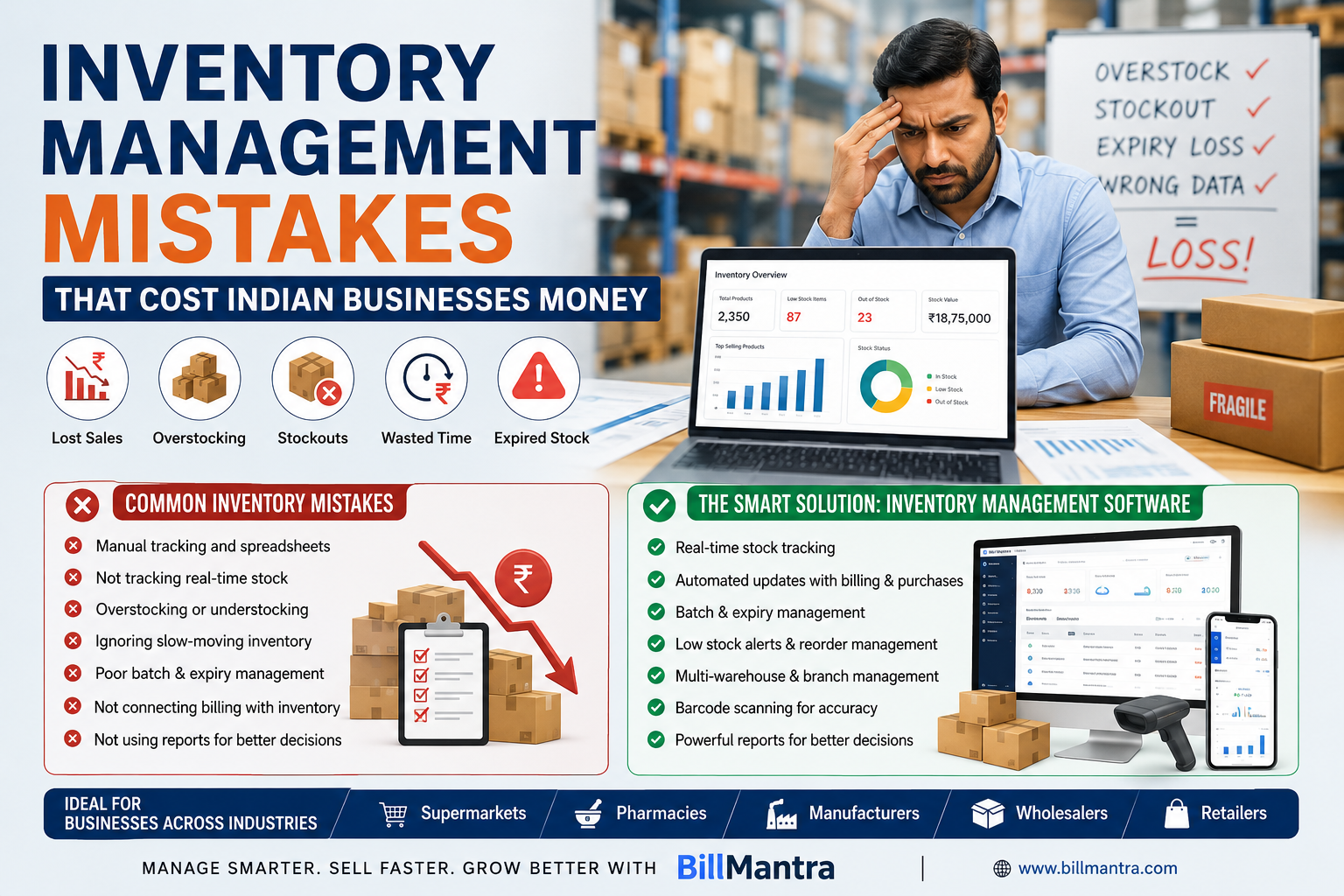
Inventory is one of the most important assets for a product-based business. Whether you run a supermarket, pharmacy, retail store, wholesale business, or manufacturing company, the way you manage inventory directly affects your cash flow, customer satisfaction, profitability, and growth.
Yet many Indian businesses still rely on spreadsheets, notebooks, disconnected billing systems, or outdated inventory processes. These methods may work when a business is small, but as product volumes and transactions increase, inventory mistakes can become expensive.
A business may have too much stock sitting in a warehouse while important products are unavailable on the shelves. Expired products may go unnoticed, stock records may not match physical inventory, and slow-moving products may continue consuming valuable working capital.
This is where Inventory Management Software can make a major difference.
Modern inventory software helps businesses track stock in real time, manage purchases and sales, monitor warehouses, identify low-stock products, manage batches and expiry dates, and make better purchasing decisions.
For Indian businesses, choosing the right Inventory Management Software is not simply about counting products. It is about creating a connected system where inventory, billing, purchasing, accounting, and reporting work together.
In this guide, we will discuss the most common inventory management mistakes that can cost businesses money, explain how businesses can avoid them, compare manual inventory management with software-based systems, and show how BillMantra can help Indian businesses improve inventory control.
Table of Contents
- What Is Inventory Management?
- Why Inventory Management Matters for Indian Businesses
- Inventory Management Mistakes That Cost Businesses Money
- Mistake #1: Relying on Manual Inventory Tracking
- Mistake #2: Not Tracking Real-Time Stock
- Mistake #3: Overstocking Products
- Mistake #4: Understocking Fast-Moving Products
- Mistake #5: Ignoring Slow-Moving Inventory
- Mistake #6: Poor Batch and Expiry Management
- Mistake #7: Not Connecting Billing With Inventory
- Mistake #8: Poor Purchase Management
- Mistake #9: Ignoring Warehouse and Branch-Level Stock
- Mistake #10: Not Using Barcode-Based Inventory
- Mistake #11: Failing to Monitor Inventory Reports
- Mistake #12: Not Maintaining Accurate Product Data
- Manual Inventory Management vs Inventory Management Software
- How Inventory Management Software Helps Businesses
- Inventory Management Software for Different Industries
- How BillMantra Helps Indian Businesses Manage Inventory
- Practical Business Example
- How to Choose the Best Inventory Management Software
- Inventory Management Checklist
- Frequently Asked Questions
- Conclusion
- Call to Action
What Is Inventory Management?
Inventory management is the process of purchasing, storing, tracking, selling, and replenishing products in a business.
It helps businesses know how much stock they have, where the stock is located, how quickly products are selling, and when new inventory should be purchased.
Effective inventory management includes activities such as:
- Stock tracking
- Purchase management
- Sales tracking
- Stock transfers
- Warehouse management
- Batch tracking
- Expiry management
- Barcode management
- Stock adjustments
- Reordering
- Inventory reporting
The goal is simple: maintain the right products, in the right quantities, at the right locations, at the right time.
Poor inventory management can result in excess stock, stockouts, expired products, unnecessary storage costs, and lost sales.
Why Inventory Management Matters for Indian Businesses
Inventory can represent a significant amount of money for businesses that sell or manufacture physical products.
For a retailer, inventory may include hundreds or thousands of individual products.
For a supermarket, there can be thousands of SKUs across food, beverages, household products, personal care items, and other categories.
For a pharmacy, inventory management becomes even more important because products can have different batches and expiry dates.
For manufacturers and wholesalers, inventory can exist across raw materials, finished goods, warehouses, and distribution locations.
Without accurate inventory information, business owners may make poor purchasing and sales decisions.
Inventory Directly Affects Cash Flow
Money invested in unsold inventory is not immediately available for other business needs.
If a business purchases more products than required, capital can remain blocked in inventory.
Inventory Affects Customer Satisfaction
When customers visit a store expecting a product and find it unavailable, they may purchase it from a competitor.
Inventory Affects Profitability
Expired, damaged, obsolete, or slow-moving products can reduce margins and increase losses.
Inventory Affects Purchasing Decisions
Accurate stock data helps businesses decide what to purchase, when to purchase it, and how much to order.
This is why Inventory Management Software has become an important tool for growing Indian businesses.
Inventory Management Mistakes That Cost Businesses Money
Mistake #1: Relying on Manual Inventory Tracking
One of the most common inventory mistakes is relying completely on notebooks, spreadsheets, or manual stock registers.
Manual tracking can become difficult when the number of products and transactions increases.
A retailer may sell hundreds of products every day. Recording each transaction manually and updating stock afterward creates opportunities for mistakes.
Problems With Manual Inventory Tracking
- Data entry errors
- Duplicate records
- Missing transactions
- Delayed stock updates
- Difficult reporting
- Time-consuming reconciliation
- Poor visibility
A small business may initially manage inventory manually, but growing businesses usually need a more structured system.
Better Approach
Use Inventory Management Software that automatically updates stock when sales and purchases are recorded.
This reduces repetitive work and gives businesses faster access to inventory information.
Mistake #2: Not Tracking Real-Time Stock
Knowing your current inventory is essential.
If your stock records are updated only once a day, once a week, or at the end of the month, your business may operate with outdated information.
Imagine a retailer showing 20 units available in its records.
During the day, 15 units are sold.
If the inventory is not updated, the system still shows 20 units even though only 5 are physically available.
This can result in:
- Incorrect purchasing decisions
- Customer disappointment
- Stockouts
- Incorrect sales planning
- Inventory reconciliation problems
Better Approach
Use software that updates stock based on sales and purchases.
Real-time inventory visibility allows businesses to make faster and more informed decisions.
Mistake #3: Overstocking Products
Buying too much inventory may seem safe, but excessive stock can create financial problems.
Businesses often overstock because they expect future demand to increase or because suppliers offer bulk discounts.
However, products may not sell as expected.
Costs of Overstocking
- Capital gets blocked
- Storage costs increase
- Products can become obsolete
- Expiry risk increases
- Warehouse space gets occupied
- Discounting may become necessary
For example, a fashion retailer may purchase a large quantity of a particular design expecting high demand.
If the trend changes, the retailer may be forced to sell the remaining stock at a discount.
Better Approach
Analyze sales history and inventory reports before making large purchasing decisions.
Use stock reports to identify fast-moving, slow-moving, and non-moving products.
Mistake #4: Understocking Fast-Moving Products
The opposite problem is understocking products that customers frequently purchase.
A supermarket may run out of a popular product during a weekend.
A pharmacy may not have an essential medicine when customers need it.
A retailer may lose customers because a popular product is unavailable.
Why Stockouts Are Expensive
Stockouts can result in:
- Lost sales
- Lost customers
- Reduced customer loyalty
- Emergency purchasing
- Higher procurement costs
Better Approach
Identify fast-moving products and maintain appropriate reorder levels.
An effective inventory system should help businesses monitor stock levels and identify products that need replenishment.
Mistake #5: Ignoring Slow-Moving Inventory
Slow-moving inventory can quietly reduce profitability.
A product may not be completely unsold, but if it takes months to sell, the money invested in it remains tied up.
Examples
A retailer may have outdated accessories.
A hardware store may have products that customers rarely purchase.
A wholesaler may have products that are no longer in high demand.
Better Approach
Regularly review inventory reports.
Identify:
- Fast-moving products
- Slow-moving products
- Non-moving products
- High-value products
- Low-value products
Once identified, businesses can consider promotions, discounts, bundle offers, or purchasing adjustments.
Mistake #6: Poor Batch and Expiry Management
Batch and expiry management is particularly important for pharmacies, supermarkets, food businesses, cosmetics businesses, and other industries that sell products with expiry dates.
If businesses do not track expiry information properly, products may expire before they are sold.
This creates direct financial loss.
Common Problems
- Expired products remaining in inventory
- Wrong batch being sold
- Poor stock rotation
- Difficulty identifying near-expiry products
- Manual expiry checks
Better Approach
Use Inventory Management Software with batch and expiry tracking.
Businesses can organize stock according to batch information and monitor products approaching expiry.
This can be especially valuable for pharmacies and FMCG businesses.
Mistake #7: Not Connecting Billing With Inventory
Billing and inventory should not operate as completely separate systems.
When a product is sold, the inventory should reflect that sale.
When a purchase is received, inventory should be updated.
If billing and inventory are disconnected, businesses may have to enter the same information multiple times.
Problems With Separate Systems
- Duplicate data entry
- Delayed stock updates
- Incorrect inventory records
- More administrative work
- Difficult reconciliation
Better Approach
Choose integrated software where billing and inventory work together.
BillMantra combines billing, inventory, accounting, purchases, payments, and reporting in one business management platform.
Mistake #8: Poor Purchase Management
Purchasing too much or too little inventory can negatively affect a business.
Without accurate inventory information, purchasing decisions may depend on guesswork.
A business may order products it already has in excess while failing to purchase items that are actually running low.
Better Purchase Management Requires
- Current stock information
- Sales history
- Supplier information
- Purchase history
- Reorder planning
- Stock reports
Integrated software helps businesses connect purchase activity with inventory data.
Mistake #9: Ignoring Warehouse and Branch-Level Stock
Businesses with multiple branches or warehouses need to know where their inventory is located.
Imagine a business has three stores:
- Delhi
- Gurugram
- Noida
One location may have excess inventory while another location has a stock shortage.
Without location-level visibility, the business may unnecessarily purchase new stock instead of transferring available stock between branches.
Better Approach
Use Multi-Warehouse Inventory Management Software that provides location-wise stock visibility.
Stock transfers can help businesses move products between branches based on demand.
Mistake #10: Not Using Barcode-Based Inventory
Manually entering product names and quantities increases the possibility of errors.
Barcode scanning can make inventory and billing faster.
Barcode Benefits
- Faster product identification
- Faster billing
- Reduced data-entry errors
- Better stock tracking
- Easier product management
For supermarkets, retail stores, pharmacies, and warehouses, barcode-based systems can significantly improve operational efficiency.
Mistake #11: Failing to Monitor Inventory Reports
Inventory data becomes valuable only when businesses use it to make decisions.
Some businesses collect inventory information but rarely analyze it.
This can result in missed opportunities.
Useful Inventory Reports
- Current stock report
- Stock valuation report
- Fast-moving products
- Slow-moving products
- Stock movement report
- Purchase report
- Sales report
- Warehouse-wise stock
- Branch-wise stock
- Batch report
- Expiry report
Regular reporting helps business owners understand where money is being invested and which products are generating sales.
Mistake #12: Not Maintaining Accurate Product Data
Inventory accuracy depends on accurate product information.
Incorrect product names, SKUs, units, prices, GST rates, HSN codes, or stock quantities can create problems across billing and reporting.
Better Approach
Maintain a clean product master.
Each product should have relevant information such as:
- Product name
- SKU
- Barcode
- Category
- Unit
- Selling price
- Purchase price
- GST information
- HSN code
- Opening stock
- Reorder level
Good product data creates a stronger foundation for inventory management.
Manual Inventory Management vs Inventory Management Software
| Feature | Manual / Spreadsheet Method | Inventory Management Software |
|---|---|---|
| Stock Tracking | Manual updates | Automated updates |
| Billing Integration | Usually separate | Can be integrated |
| Real-Time Visibility | Limited | Available |
| Barcode Support | Limited | Supported by many systems |
| Multi-Warehouse | Difficult | Easier |
| Batch Tracking | Manual | Automated/organized |
| Expiry Tracking | Difficult | Easier |
| Reports | Manual preparation | Automated reports |
| Stock Transfers | Manual | System-based |
| Data Accuracy | Depends on manual entry | Higher automation |
| Scalability | Limited | Better for growing businesses |
Manual systems may work for very small operations, but they become increasingly difficult as the business grows.
How Inventory Management Software Helps Businesses
Real-Time Stock Visibility
Businesses can check current inventory without manually counting every product.
Automated Stock Updates
Sales and purchase transactions can update inventory records.
Better Purchasing Decisions
Businesses can use stock and sales data to determine what needs to be purchased.
Multi-Warehouse Management
Businesses can monitor inventory across multiple warehouses and locations.
Batch Tracking
Businesses can organize products according to batch information.
Expiry Management
Expiry tracking can help reduce losses caused by expired products.
Barcode Management
Barcode scanning can make billing and stock management faster.
Business Reporting
Inventory reports provide useful information for business decisions.
Better Integration
When inventory is connected with billing, purchasing, and accounting, businesses can reduce duplicate work.
Inventory Management Software for Different Industries
Supermarkets
Supermarkets manage thousands of products and high transaction volumes.
They need:
- Barcode billing
- Real-time inventory
- Fast checkout
- Multiple payment modes
- Stock reports
- Purchase management
- Low-stock monitoring
A connected inventory and POS system can help supermarkets manage large product catalogues more efficiently.
Pharmacies
Pharmacies need strong control over:
- Batch numbers
- Expiry dates
- Product quantities
- Purchase records
- Sales records
- Supplier information
For pharmacies, batch and expiry management should be an important consideration when selecting inventory software.
Manufacturers
Manufacturers may need to manage raw materials, finished goods, purchases, production-related inventory, and warehouses.
Useful features include:
- Purchase management
- Stock tracking
- Warehouse management
- Batch management
- Supplier records
- Inventory reports
Wholesalers
Wholesalers often deal with high-volume transactions and multiple customers.
They may need:
- Multi-warehouse inventory
- Customer-wise sales
- Purchase management
- Stock transfers
- Payment tracking
- Inventory reports
Retailers
Retail stores need fast billing and accurate stock information.
Important features include:
- POS billing
- Barcode scanning
- GST billing
- Stock tracking
- Customer management
- Purchase management
- Sales reports
Why BillMantra Is a Smart Choice for Inventory Management
BillMantra is a cloud-based business management platform designed for Indian SMEs, retailers, wholesalers, distributors, manufacturers, and service businesses.
It combines inventory management, GST billing, accounting, payments, purchasing, POS billing, reporting, and business operations in one platform.
This integrated approach can help businesses avoid the problems caused by disconnected systems.
Key Inventory Features in BillMantra
Real-Time Stock Tracking
Businesses can maintain a more accurate view of available inventory based on sales and purchase activity.
Multi-Warehouse Management
Businesses operating multiple warehouses can organize inventory across different locations.
Batch Tracking
Batch information can help businesses manage products more systematically.
Expiry Management
Expiry tracking can be especially useful for pharmacies, supermarkets, food businesses, and other businesses dealing with expiry-sensitive products.
Stock Transfers
Businesses with multiple locations can transfer stock between branches or warehouses based on operational requirements.
Barcode Solutions
BillMantra supports barcode-related workflows including:
- Barcode design
- Barcode printing
- Thermal printer support
- A4 label printing
Purchase Management
Inventory management becomes more effective when purchasing is connected with stock.
BillMantra includes:
- Purchase Orders
- Supplier Ledger
- GRN Management
- Import Management
- Job Work Support
How BillMantra Connects Inventory With Billing
One of the biggest advantages of integrated software is that inventory does not have to be managed separately from sales.
For example, when a retailer sells a product through the billing system, the corresponding inventory record can be updated.
When the business receives new stock from a supplier, the purchase transaction can be reflected in inventory.
This creates a connected workflow:
Purchase → Inventory → Billing → Payment → Accounting → Reporting
Such integration can reduce duplicate data entry and provide better business visibility.
Practical Example: Supermarket Inventory Management
Consider a supermarket that manages 5,000 different products.
The store sells groceries, beverages, personal care products, cleaning supplies, and household items.
With manual inventory tracking, the store may face:
- Stock mismatches
- Long billing queues
- Overstocking
- Stockouts
- Expiry problems
- Difficult purchase planning
With integrated Inventory Management Software, the supermarket can:
- Add products to the inventory.
- Assign barcode information.
- Record purchases.
- Track stock in real time.
- Sell products through POS billing.
- Automatically update stock.
- Monitor low-stock products.
- Review sales and inventory reports.
- Track expiry-sensitive products.
- Make better purchasing decisions.
This can create a more organized inventory workflow and reduce unnecessary manual work.
Practical Example: Pharmacy Inventory Management
Consider a pharmacy that manages hundreds of medicines from different manufacturers.
Each product may have different:
- Batch numbers
- Expiry dates
- Purchase prices
- Selling prices
- Stock quantities
Manual management can make expiry tracking difficult.
With software-based inventory management, the pharmacy can maintain structured product and batch information and monitor stock more effectively.
This can help reduce the risk of expired stock remaining unnoticed.
Practical Example: Wholesaler Inventory Management
A wholesaler may operate multiple warehouses and supply products to dozens or hundreds of retailers.
The business needs to know:
- Which warehouse has stock
- Which products are selling fastest
- Which customers have outstanding payments
- Which products need replenishment
- Which suppliers provide specific products
Integrated software can provide a centralized view of these operations.
How to Choose the Best Inventory Management Software
Choosing the right software requires evaluating your business requirements.
1. Understand Your Inventory Size
Consider:
- Number of products
- Number of SKUs
- Daily transactions
- Number of warehouses
- Number of branches
2. Check Industry-Specific Features
A pharmacy may need expiry management.
A supermarket may need barcode billing.
A manufacturer may need stronger purchase and warehouse management.
A wholesaler may need multi-location inventory.
Choose software based on your actual industry requirements.
3. Check Billing Integration
Inventory software should ideally work with your billing system.
This reduces duplicate data entry and helps maintain accurate stock records.
4. Check Reporting
Make sure the system provides reports that are actually useful for decision-making.
5. Check Scalability
The software should be capable of supporting business growth.
6. Check Ease of Use
Software should be easy enough for employees to learn and use consistently.
7. Check Support and Implementation
Consider training, onboarding, customer support, updates, and data migration before making your final decision.
Inventory Management Checklist
Before choosing Inventory Management Software, ask:
- Does it provide real-time stock tracking?
- Does it integrate with billing?
- Does it support barcode scanning?
- Does it support multiple warehouses?
- Does it support multiple branches?
- Does it support batch tracking?
- Does it support expiry management?
- Does it provide stock transfer functionality?
- Does it integrate with purchase management?
- Does it provide stock reports?
- Does it provide sales reports?
- Does it provide purchase reports?
- Can it track customer and supplier information?
- Does it support POS billing?
- Does it support GST billing?
- Does it provide accounting integration?
- Is it cloud-based?
- Can it scale as the business grows?
- Is customer support available?
Frequently Asked Questions
1. What is Inventory Management Software?
Inventory Management Software is a digital solution that helps businesses track, organize, purchase, sell, and manage inventory more efficiently.
2. Why is inventory management important for businesses?
Effective inventory management helps businesses reduce stockouts, avoid excessive inventory, control storage costs, manage expiry, and make better purchasing decisions.
3. Is Inventory Management Software useful for small businesses?
Yes. Even small retailers and wholesalers can benefit from better stock visibility, automated updates, reporting, and organized inventory records.
4. What are the biggest inventory management mistakes?
Common mistakes include manual tracking, overstocking, understocking, ignoring slow-moving products, poor expiry management, disconnected billing, inaccurate product data, and inadequate reporting.
5. Can inventory software reduce stockouts?
Inventory software can help businesses monitor stock levels and identify products that may require replenishment. However, businesses still need appropriate reorder policies and purchasing decisions.
6. Is inventory software useful for supermarkets?
Yes. Supermarkets can benefit from barcode billing, real-time inventory tracking, purchase management, stock reports, and fast POS billing.
7. Is inventory management software useful for pharmacies?
Yes. Pharmacies can particularly benefit from features such as batch tracking, expiry management, purchase records, sales tracking, and stock monitoring.
8. Can manufacturers use Inventory Management Software?
Yes. Manufacturers can use inventory software to manage raw materials, finished goods, purchases, warehouses, suppliers, and stock movement.
9. Can wholesalers manage multiple warehouses?
Yes, if the selected inventory solution provides multi-warehouse functionality. This allows businesses to maintain location-wise stock information and manage stock transfers.
10. Does BillMantra provide inventory management?
Yes. BillMantra provides inventory features including real-time stock tracking, multi-warehouse management, batch tracking, expiry management, and stock transfer capabilities.
11. Does BillMantra support barcode management?
Yes. BillMantra provides barcode-related features including barcode design, barcode printing, thermal printer support, and A4 label printing.
12. Can BillMantra connect inventory with billing?
Yes. BillMantra combines billing and inventory management, allowing businesses to manage sales and stock through an integrated business workflow.
Conclusion
Inventory mistakes can quietly reduce the profitability of Indian businesses.
A business may lose money through overstocking, stockouts, expired products, slow-moving inventory, inaccurate records, unnecessary purchases, and inefficient warehouse management.
The problem becomes more serious as the business grows.
Supermarkets may manage thousands of products. Pharmacies need to monitor batches and expiry dates. Wholesalers may operate multiple warehouses. Manufacturers need to manage raw materials and finished goods. Retailers need fast billing and accurate stock information.
In all these situations, accurate inventory information is essential.
This is why investing in the right Inventory Management Software can be an important step for a growing business.
The right software can connect inventory with billing, purchasing, payments, accounting, barcode management, warehouses, and reporting. Instead of relying on disconnected spreadsheets and manual records, businesses can create a more organized and data-driven inventory process.
BillMantra provides an integrated solution for Indian businesses with features such as real-time stock tracking, multi-warehouse management, batch tracking, expiry management, stock transfers, barcode solutions, purchase management, GST billing, POS billing, accounting, and business reporting.
However, businesses should always select software based on their specific requirements.
Before making a decision, evaluate the number of products you manage, transaction volume, number of locations, industry-specific needs, reporting requirements, billing integration, scalability, and customer support.
Good inventory management is not simply about knowing how many products are available.
It is about knowing what to buy, when to buy it, where the stock is located, what is selling, what is not selling, and how inventory is affecting your business finances.
With the right technology and processes, Indian businesses can reduce avoidable inventory mistakes, improve operational efficiency, and make more informed decisions.
Take Control of Your Inventory With BillMantra
Are inventory mistakes affecting your sales, cash flow, or daily operations?
BillMantra helps Indian businesses manage inventory, billing, GST, accounting, purchasing, payments, warehouses, barcode solutions, and business reports from one integrated platform.
Whether you operate a supermarket, pharmacy, retail store, wholesale business, manufacturing company, or distribution business, BillMantra can help you organize your inventory and streamline everyday operations.
See How BillMantra Can Help Your Business
Manage your stock smarter. Reduce manual work. Improve business visibility.
Try BillMantra free
GST invoices, inventory, payments, reports — all in one app. No credit card.
Get started →